Pages

Showing posts with label social learning. Show all posts

Thursday, April 21, 2011

Another Student Feedback from a Project - Authentic Learning and Web 2.0

I was a student enrolled in the Certificate of Boat building
program at the Institute of Applied Science, Unitec. One of those exciting
things during the course is the elearning perspective based on Web 2.0
technology and applications, which was introduced and promoted by Vickel.

Despite the concept of Web 2.0 sounds quite complicated or specialized,
this new educational approach actually uses daily computer software and
program, online applications and resources, and other IT technologies we
use everyday, such as 3G network on our mobile, recording video and taking
pictures with camera or smart phone, etc.

Based on this approach, we (tutors and students all together) established a
comprehensive Web2.0 e-learning platform. Everyone got their own Blog. In
the blog, students can write down what they have done today, what are they
thinking, or what kind of help they need. Other students and tutors can read
his blog and make comments on it. Moreover, blog is also used to create
students’ portfolio (now we call it e-portfolio). Students are asked to take
photos and videos during the workshop, and upload them to the blog. Other
internet applications and webs, such as Google Docs, Buzz and YouTube are
used as well as useful tools to improve communications between students
and tutors.

I really liked this Web2.0 concept and I think its application in the CAT program
is quite successful. I think it has following advantages:

1. Improved communication between students and tutors with little or
no limitation of time and place. Compared with face-to-face meeting
and communication, students and tutors now can communicate online.
You can post your ideas, thoughts, suggests or comments at anytime,
anywhere. You do not have to be in the workshop in order to discuss
with your mates and the tutor.
2.  An effective way to record work and study. As pictures and videos are
made during the workshop, students can upload them onto their blog.
This provides a dynamic and expressive source for constructing their e-
portfolio online.
3.  More progress-oriented and better supervision on students’ work
and study. Students are asked to write their blog based on their daily
learning process. Tutors can see how each student is doing all the
way through the course. This gives opportunity for tutors to make more
comprehensive and flexible assessment on the student on the basis of
his learning process, not only on the basis of the final outcome.
4. Students are more motivated. Well, as a student, your assessment
and portfolio will be based on what you have put on your blog. So you
need pay more attention on your daily study. Moreover, you can also
help other students if they post any questions on the blog and make comments on their works. And remember, other students can do the
same to you.
5.  It does not increase the cost of study. Software, applications, websites
and other devices and technologies used in the Web2.0 educational
approach are mostly free. You might need a cellphone that can take
pictures and videos. If you happened to have not got one, do not worry.
You can borrow the camera from the institute.

(Former student in the Boat Building course, Unitec New Zealand)
 
Creative Commons License this blog post by Vickel Narayan is licensed under a Creative Commons Attribution-NonCommercial 3.0 New Zealand License.
Thursday, June 3, 2010

Motivators in Learning - Great Youtube Video

Tuesday, June 1, 2010

Curatr Review

Curatr - Review


I have had sometime (maybe 1 hour) to play with much talked about Curatr ..... first impressions:

1. The so called Gaming Aspect of Curatr. 

It works by collating scores whenever you view a resource and either you like or dislike it (Yes, it's mandatory, you can't move to the next lesson unless you have done this!). I was quite disappointed to find out how scoring worked (I could be wrong).

2. No place for feed on an activity

I have been through a few resources on the account I was given and I couldn't see any place to leave a feedback or to comment on existing content.

3. Content driven - driven both by the teacher and students

Curatr is unfortunately content driven and is limited to Websites, Youtube, Text box (it didn't work for me), Pictures and Audio. This of course assumes that you have created the content before hand and uploaded it to appropriate platform for use. Curatr however allows peers to create or lets say collate contents to help others in class.

4. Difficult user interface

I initially found the user interface difficult to use. I couldn't make out where I was going and what I was meant to be doing or looking at first.

Where's the Pedagogy?

The burning question, what was the pedagogical underpinning for Curatr? You couldn't really say social constructivist .... maybe a beginnings of something bigger to come? The only bit I would say that would very least be called social was creating or collating resources that you found useful for others in class to use. Curatr allows you to create a profile but again it is very basic and you can't see the profiles of others in class. There is very little opportunity to network with other learners in class to discuss collectively and create new meaning and knowledge.

I was left asking .... it is a portal? Is it a basic social bookmarking tool .... I am still a bit confused. It seems the only thing you can do is create a portable (works on iPhone) collection of different digital artifacts that may help you in your learning or peers in some way.

Mobile Front - Comparing to Evernote

Yes Curatr has an iPhone app, so does Evernote. If I was to compare these two applications and it's suitability in learning and teaching, I'd say Evernote would be my choice. The difference I am talking about is huge.

  1. Teacher vs Student content (Curatr allows students to collect content not necessarily their own)
  2. Networking opportunities between the two apps is again a problem. Curatr - hardly any evidence. Evernote - and online profile viewable by others.
  3. mLearning - even though Curatr has an iPhone app, it hardly uses the powerful features the iPhone is equipped with. Evernote on the other hand allows - on spot - audio capture, picture, video and text. Evernote empowers the students, enables them to create content and hence their own meaning from it. It enables students to share with each other what they have done and build collective understanding at the same time supporting each other.
I was expecting more from Curatr. The promotion video and hype that surrounded Curatr before launch of beta painted a totally different picture in my head to what was delivered. The claims around game based learning and the inclusion of what makes games so appealing didn't really work for me. It is not still about scores when playing a game but the challenge that comes your way, constant feedback and helpful hints that pop-up every now and then, creating that safe competitive environment where you can do a single player or a team play, having the ability to choose the level of difficulty to begin playing, the audio, visuals and constant connectedness with your team members (audio and chat if playing multiplayer online game), strategising, immersive environment and finally clever scoring.

Monday, February 22, 2010

Ah ha moment ....

I spent almost all of last week prepping the members in my CoP on social learning where I introduced Moodle and Google App concept. I have been blogging about the journey for a while, in my last blog post "I can feel the Buzz" I reported that social learning suddenly dawned upon the members early last week so I took the opportunity to take it further.

To roll out the Moodle Google Apps concept, I borrowed 2 Netbooks for the staff members who didn't have a laptop. A night before I developed a scenario for the staff members to look at the following day. I had intentionally made some mistakes and automotive not being my area of expertise there were bound to be some anyway. You can find a copy of the scenario here. I borrowed the Netbooks to give the staff members a feel of what the students will bring to class and how it can help in facilitating a social learning space.


Once I had all the staff logged onto staff wifi and Google, I gave them a quick tour of Google docs. This is when I shared the scenario with all the members and asked them to correct any mistake and add anything they thought was important. The group spent about 15 minutes doing this. I had some staff members who were already using Google hence I asked them to help the others out. After this 15 minutes I asked the members to reflect on what had just happened. Few things came up:

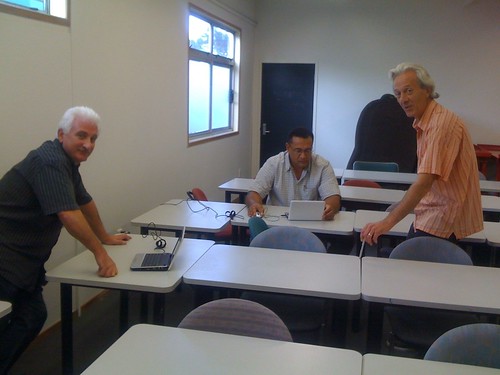
  1. the room setting, as the desks were arranged in rows, members found it difficult to communicate and help each other (refer to figure 1.1)
  2. since we had some expertise in the room, the job for the teacher became easy
  3. more time with the facilitator (one-on-one)
  4. the process was lot engaging then just watching or listening


Figure 1.1 - default classroom setting, this the members found difficult to work with, hence it will now be moved to fit the social learning requirements

I also got the members to reflect on the scenario, here are some comments:
  1. I can see lots of conversations happening
  2. students would be very active in the task
  3. teacher is not doing anything apart from being there as a guide
  4. students would probably come up with the content
  5. engaging
  6. good use of e-tools to bring together learning and social dimensions
After this I showed the staff how they can compare the original and other versions on Google doc. How Google doc is able to break it down to individual participation, also the 'real time' factor (multiple users editing the document at the same time).

Moving on from docs, it was time for blogging. If the students are expected to blog, the teachers should be leading the way. I got all the members to create a blogger account, this is easy if you already have a Google account. Blogger as an eportfolio. A requirement to becoming a senior lecturer here at Unitec, staff are to submit a portfolio of activities done in class. I used this to talk about the importance of blogging along with modeling the practice to students, PLN, reflection and it's importance on improving your teaching (reflection is the lowest common denominator, if you don't reflect you'll probably never find what you are doing wrong). I gave them a task, some members in this CoP have been involved for the past year and we have some members who only started few weeks ago. The task was to reflect on the past few weeks/year being in the CoP, the key highlights for them and what impact it may have on their teaching. Some members were uncomfortable with making their blog open hence for now they have kept it private ..... small steps at a time ..... when they are confident and comfortable with making themselves visible to the world, they'll make the blog public. This transition is something that has to come from within and it can't be forced.


We closed the session discussing other possible elearning tools and Second Life was mentioned. I was asked to talk further on it hence I showed them a video from Youtube, one closer to home, the SLENZ Birthing Unit and another random video simulating how a jet engine works.


After this session the feedback from all the members was, we could have been doing this all this time. I guess it's not a bad comment knowing none or most of them didn't want to get involved in the project. This week is student orientation week, week 2 will give the members an opportunity to practice some of the skills.

My involvement will continue as a technology steward for both staff and students, looking forward to it and the challengers.

The Automotive department has made some changes that will allow students to buy a Netbook or any other machine they prefer. The course previously required the students to buy the mechanical tools needed in the course. The school is now buying a common set for all students and will be used as needed, this saves student money with which they are to buy a computer. By week 2-3 we should have a good indication of how many students have bought a laptop. The mandatory requirements for the computer were set as: webcam and wifi.

Tuesday, February 16, 2010

Google App and Moodle a concept

Google Buzz? Does this now make Google Apps a one-stop, all-in-one learning platform?

Absolutely yes!!! In fact whenever I am talking to the staff at my institute about Moodle and some web 2 tools, I can't stop myself from mentioning Google Apps and every time at the end I realise why would we need a LMS? Unitec this year moved all student email to Google, shame the staff will remain with Groupwise. We tried our best to move the whole institute to Google unfortunately some policies got in the way :-(.

Going back to the question I started with, why would you want to use a LMS when you can do all and more with Google Apps.

The mindmap below is still a work in progress. I'll be working on it in the coming days.


One common theme that is consistent through almost all the Google App is ability to create, collaboration and communication. This sits well with teaching that is underpinned by social learning theory. The wide range of tools audio, video, picture, text with both synchronous and asynchronous ability makes it a very enticing learning platform indeed.

The only problem for me at the moment with Google is that tools appear to be spread all over the place. iGoogle made an attempt to bring them together but it needs certain degree of tweaking and widgets for all the tools are not available.

Todays learners are ubiquitous and Google suits them really well. Anytime, any place and anytime.

Monday, February 15, 2010

I can feel the BUZZ!!!

Today was the first meeting of my community of practice. We started this CoP early last year since then I have seen the numbers grow, shrink and grow again late last year. I was in for a surprise this morning. I couldn't believe the words I was hearing.

The CoP was formed with staff mostly from the school of built environment. The aim was to up-skill the staff interested on use of technology in education. The ride had been rough and at times thoughts did cross my mind if the CoP was actually serving the purpose it was setup for.

Last year was basically spent laying the foundation having realised that the staff were still stuck in the traditional teaching method. Nothing wrong here it makes sense since most of the staff join the institute straight from the trade sector and didn't necessarily have any teaching experience. Their only teaching experience is likely to be the one they had, when they schooled (likely to be traditional teaching method, transmission) hence their teaching style would be a reflection of this experience.

Almost all of last year was spent on changing the mindset of the staff involved. It's a critical stage of the change and from experience a sensitive issue. In some cases I was going to challenge some staff who had been teaching for the past 14 or so years and for them the method has worked, students graduated and also managed to achieved decent success rate so why would anyone change something that was working 'fine'.

I had tried many approaches from modeling, showcasing the benefits, putting them through a blended learning course (only a 2 hour session) and even bringing an outsider to share her experience with her students in going from traditional to blended and sharing the benefit. It made no difference ..... I could feel the skepticism in the room.

The cows didn't come home till the end of last week. Two of the staff in my CoP were involved in a week long workshop on CoP with Etienne Wenger and Bev Trayner. The week was full of social activities and use of technology modeled were appropriate. I have to admit the week long workshop was a great showcase of social learning and how to facilitate it.

This morning when I entered the meeting room, things were already underway. The sound I was hearing couldn't have been any sweeter. I was hearing words like co-create, students don't need books, tools like Youtube, Flickr and even Second Life were being mentioned. Social learning was being discussed to a great extent, staff were strategizing scavenger hunts involving students going as far as choosing their own projects, bringing some degree of authenticity in the assessment. It just sounded so right that I just seat back and heard the discussion without getting involved.

Reflecting on the past year and this CoP, time sometimes is the key, both allowing the time for the participants to reflect and get a handle on the new concepts and letting it sink in and at the same time having the time to model the approach, obviously 2 hours wasn't enough. The need/purpose and authenticity is critical as well. My modeling session was perhaps too superficial when compare to the week long session with Etienne and Bev.

We are meeting this week Wednesday to design a blended learning course that would put students in the centre of their own learning.

Tuesday, February 9, 2010

Jacqui McDonald from USQ, Australia sharing her experience on Community of Practice at her Institute


Jacqui and Co wrote a paper and presented at Herdsa here is a link to the paper: http://unitec-ccs.wikispaces.com/file/view/McDonald_Collins_Hingst_Kimmins_Lynch_Star_HERDSA_2008.pdf The video above discusses some of the issues talked about in detail in this paper.

Monday, February 8, 2010

Community of Practice workshop day 1

The day officially began with a powhiri at the Unitec Marae. I have to say, having been to the Marae about 4 times since it opened last year, I got to hear the story behind where the aspiration for the design came from. All the carvings in the Marae present something from Unitec and the history of Aotearoa (early settlement and developments from here on). The carvings inside most Marae's represent Maori gods but the Unitec Marae is different. It is different because it has a 'community feel in it', it brings together people from all cultural backgrounds and the carvings reflect this.

After the powhiri Etienne gave a very moving speech, not very long but the message he sent out had an immediate effect and showed what sort of person Etienne really is. In my previous blog post I said he was a humble man and in his speech he showed exactly this.

We had morning tea and from here on the day kicked into gear. Ray Meldrum delivered a session on living curricula ( another strategy that ties in quite well with the eLearning strategy). This was followed up by Etienne and Bev with a session on CoP and intro session where they reflected on their own experiences with some CoP's they had been involved in. For me the important message was 'CoP can not be forced', it has to be organic and this is where the strength of a CoP comes from. Etienne even went as far as saying a CoP that is forcefully imposed on a group of people will fail, he then reflected on some of his experience on this. I streamed this session on the internet live using livesteam (url for the stream: livestream.com/ewsessions). I am happy to report I had about 14 views and 3 of them joined in from Australia. I'll be broadcasting the morning sessions every day for this week, you can catch this on the url given above.

The afternoon session focused on finding a purpose for the CoP and identifying the issues that may arise in the process. We'll take this further tomorrow in the afternoon session. I'll blog more on this tomorrow.


(The group session)